How to Do the Bicep Heart Trend for Free

Updated 2026-11-04

The pose itself is free, it's just your arm. Here's how to film it well, and when paying for an AI version makes sense.

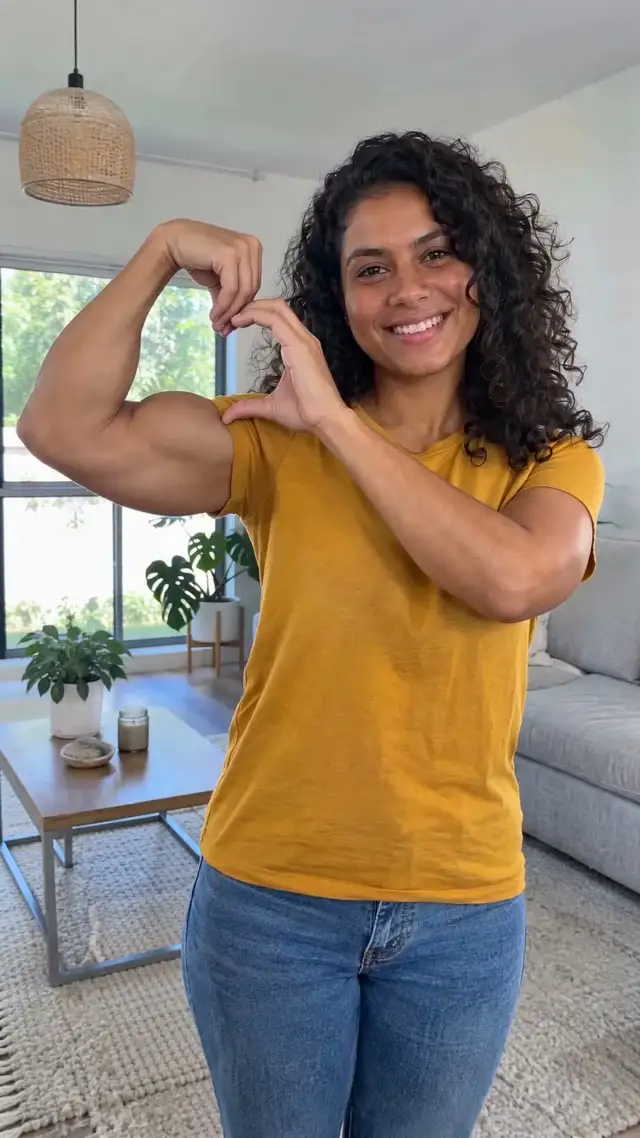
Bicep heart AI video: a woman flexes one arm and rests her other hand on the bicep to form a small heart. The woman is AI-generated.Example · AI-generated

Made on this site from one AI-generated photo · 7 seconds, 720p

Same trend. Your photo. Pets and people in examples are AI-generated.

Free: film it in three steps

Prop your phone at chest height and step back until both arms are in frame. Flex one arm with the wrist bent toward you. Bring the other hand up, curve the fingers over the top of the bicep and tuck the thumb under it so the gap makes a heart. Hold it, smile, and stop recording. Add the trend sound in TikTok.

Tips that make the free version look better

Face a window for soft light. Wear short sleeves so the bicep is visible. Turn the flexed arm slightly toward the camera so the heart shape reads. Two or three takes are normal.

Free AI credits in other apps

General AI video apps often give a few free credits to new accounts. You'd describe the pose yourself, upload a photo and hope the hands come out right; hands are hard for AI, so expect retries, and free tiers often add a watermark or lower the resolution.

Paid: one photo, $4.99 once

The bicep heart video maker already knows the pose, so you only add a photo where both arms are visible. You get a 7-second, 720p video in about 5 minutes. 1 video is $4.99, 3 are $9.99, 7 are $19.99 on the pricing page. No subscription, and if it doesn't look like you we refund it. Comparing paid tools? Bicep heart AI alternatives, with prices.

Pricing

One-time video packs. No subscription.

1 video

$4.99

1 video (HD · 720p) · $4.99 each

Most popular

3 videos

$9.99

3 videos (HD · 720p) · $3.33 each

7 videos

$19.99

7 videos (HD · 720p) · $2.86 each

No sign-up needed to buy – we email your video and a sign-in link.

FAQ

Is there a free bicep heart AI generator?
Some general AI video apps have free trial credits, but you set up the pose yourself. This site doesn't have a free tier; videos start at $4.99, paid once.
What's the easiest free way?
Film it yourself with a phone on a stand. It takes a minute and costs nothing.
Why pay for an AI version?
If you don't want to film, can't get the hand heart to look right, or want your pet to do it.
Can I get a refund?
Yes. Email support@bicepheart.app and we refund that video. Failed videos give their credit back automatically.