How to Make a Bicep Heart AI Video

Updated 2026-11-04

Add one photo of you or your pet where both arms show and about 5 minutes later you have a 7-second, 720p bicep heart video. $4.99 a video, paid once with no subscription; no sign-up needed to buy – we email your video and a sign-in link.

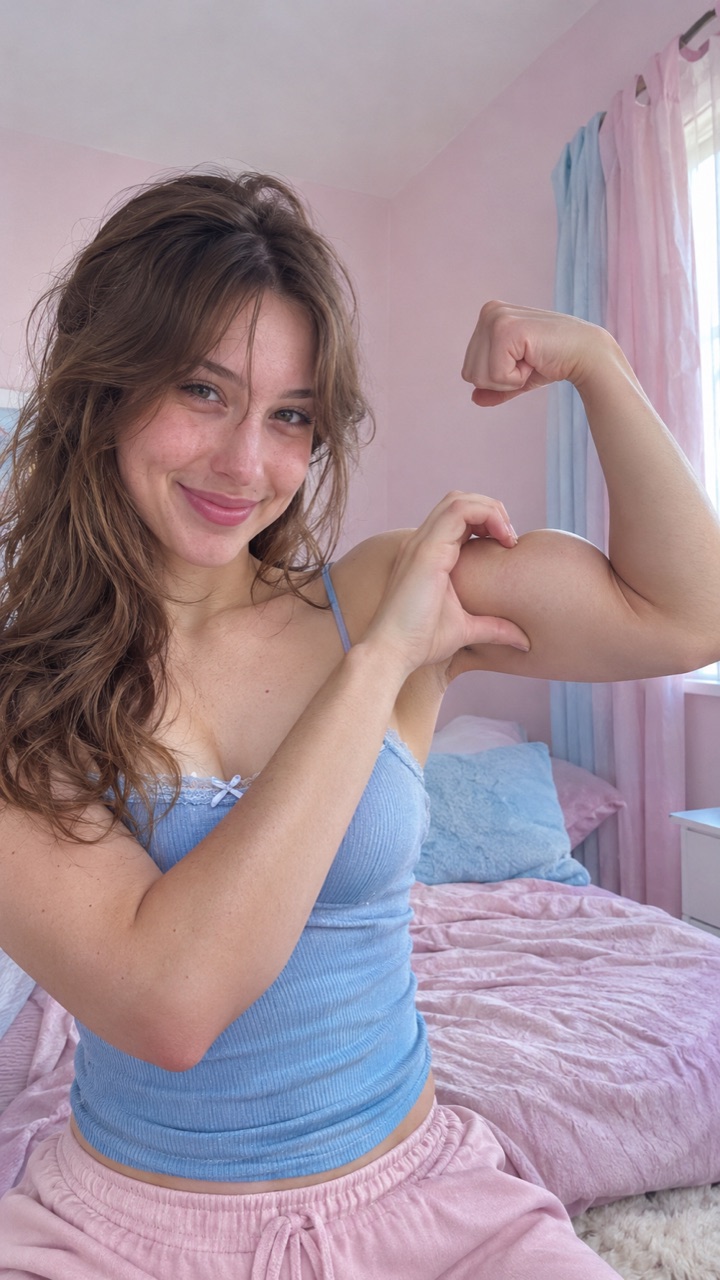
Bicep heart pose: a woman flexing one arm with a hand heart on her bicepExample · AI-generated

The pose: one arm flexed, the other hand curved into half a heart on the bicep (AI-generated still)

Same trend. Your photo. Pets and people in examples are AI-generated.

What the bicep heart trend is

You flex one arm, then curve the other hand into half a heart and press it against the bicep, so your hand and the muscle make one small heart. It's usually done with a shy smile, like you got caught being cute. The heart sits on the arm; it isn't a big heart over your head.

The trend took off on TikTok around October 31 and November 1, 2026, with widely shared videos by @mckennacrisp and @kavithageorge (an earlier one by @hunnybakes was posted on October 30). Credit for the idea goes to those creators; this site makes AI versions from your photo.

Step 1: Choose a photo with both arms in it

Use a photo from your head to your waist, with both arms fully in the frame, your face turned to the camera and good light. One person or one pet. A face-only selfie won't work, because there are no arms to flex. Avoid sunglasses, group photos and heavy filters.

Step 2: Pick you or your pet

Open the bicep heart video maker, add your photo and choose Me or My pet. With a pet, your dog or cat lifts one front leg in a proud flex and a red heart pops up next to the paw.

Step 3: Pay once with your email

Enter your email (no sign-up) and pick a pack on the pricing page: 1 video for $4.99, 3 for $9.99 or 7 for $19.99. One video uses one credit. It's a one-time payment, not a subscription.

Step 4: Download and post

About 5 minutes later your video is in My videos. You can close the page while it's made. Download it with the AI-made music, or take the silent copy, upload it to TikTok, tap Add sound and pick the trend's sound.

If something looks off

The face doesn't look like you: use a sharper, front-facing photo with even light. The hand heart came out wrong or the fingers look odd: try a photo where both hands are clearly visible. Either way, email us and we refund that video. A failed video refunds its credit automatically.

Pricing

One-time video packs. No subscription.

1 video

$4.99

1 video (HD · 720p) · $4.99 each

Most popular

3 videos

$9.99

3 videos (HD · 720p) · $3.33 each

7 videos

$19.99

7 videos (HD · 720p) · $2.86 each

No sign-up needed to buy – we email your video and a sign-in link.

FAQ

How long is a bicep heart AI video?
7 seconds, 720p, vertical 9:16, as an MP4 file.
Is there a watermark?
Only a small AI-generated mark in the bottom-right corner.
Does it come with the bicep heart sound?
It comes with music made by the AI, plus a silent copy so you can add the trend sound in TikTok.
Can my dog or cat do the bicep heart?
Yes. Pick My pet; it lifts one front leg in a proud flex and a red heart pops up next to the paw.
How much does a bicep heart video cost?
$4.99 for 1 video, $9.99 for 3 or $19.99 for 7. You pay once, there's no subscription, and the videos you buy don't expire.
Is it free?
No. There's no free video here: each video uses one credit, from $4.99. You can watch the example videos before paying, and if the result doesn't look right we refund it. What you can do for free
Do I need to sign up?
You can add your photo and pick an option without an account. No sign-up needed to buy: enter your email at checkout and we email your video and a sign-in link. Prefer Google? You can sign in with it instead. Your videos are saved in My videos.
How long does it take to make?
Usually about 5 minutes from pressing the button. You can leave the page open or come back to My videos later.
What photo works best?
One person or pet, head to waist, with both arms (or front legs) visible, facing the camera in good light. A face-only selfie doesn't work, because there are no arms to flex.
What if I don't like the result?
Email support@bicepheart.app and we refund that video. If a video fails to generate, the credit goes back to your balance automatically.
What happens to my photo?
It's only used to make your video and isn't used to train AI. Uploaded photos are deleted after 7 days, and you can delete your videos anytime.
How is this different from a CapCut template?
A CapCut template edits a clip you film yourself, so you still have to do the pose on camera. Here you only add a photo and the AI makes the whole video. CapCut template vs AI video